

Translating additional Bricks elements
Gato AI Translations for Polylang can translate element-based Bricks pages and templates.
The plugin ships with support for all elements provided by Bricks. For custom or 3rd-party Bricks elements, you can extend translation support via PHP hooks.
Translating strings
To declare additional translatable properties on a Bricks element, use the gatompl:bricks_element_type_translatable_properties filter.
The filter receives a [elementName => properties] map. The properties entry can hold:
- Flat control names — e.g.
'separatorText' - Dot-paths — e.g.
'home.text'(translates tosettings.home.text) - Repeater fields — declared as a sub-array
[repeaterName => [...subFields]]
These are mixed freely, and nesting can go to any depth.
For instance, this hook makes:
- The flat control
separatorTextand the dot-pathhome.texttranslatable on thebreadcrumbselement - The repeater sub-field
titletranslatable inside theitemsrepeater of theteam-memberselement
add_filter(
'gatompl:bricks_element_type_translatable_properties',
static function (array $translatableProperties): array {
$translatableProperties['breadcrumbs'][] = 'separatorText';
$translatableProperties['breadcrumbs'][] = 'home.text';
$translatableProperties['team-members']['items'][] = 'title';
return $translatableProperties;
},
10,
1
);The same filter works for both simple controls and repeater fields — there is no separate hook for repeaters.
Translating entity references
A property can store an entity ID (a post, taxonomy term, media item or menu) that should be remapped to the corresponding target-language entity at translation time. Use the matching filter:
| Reference kind | Filter |
|---|---|
| Custom posts and media | gatompl:bricks_element_type_custompost_and_media_reference_properties |
| Taxonomy terms | gatompl:bricks_element_type_taxonomy_term_reference_properties |
| Menus by ID | gatompl:bricks_element_type_menu_reference_by_id_properties |
| Menus by slug | gatompl:bricks_element_type_menu_reference_by_slug_properties |
The shape is the same as the translatable-properties filter — flat names, dot-paths or sub-arrays for repeaters.
// Custom post / media reference
add_filter(
'gatompl:bricks_element_type_custompost_and_media_reference_properties',
static function (array $properties): array {
$properties['featured-post'][] = 'post_id';
$properties['gallery']['items'][] = 'image_id';
return $properties;
}
);
// Taxonomy term reference
add_filter(
'gatompl:bricks_element_type_taxonomy_term_reference_properties',
static function (array $properties): array {
$properties['related-category'][] = 'category_id';
return $properties;
}
);
// Menu reference by ID
add_filter(
'gatompl:bricks_element_type_menu_reference_by_id_properties',
static function (array $properties): array {
$properties['menu-picker'][] = 'menu_id';
return $properties;
}
);
// Menu reference by slug
add_filter(
'gatompl:bricks_element_type_menu_reference_by_slug_properties',
static function (array $properties): array {
$properties['menu-picker'][] = 'menu_slug';
return $properties;
}
);Discovering element names and property names
Run the Translate custom posts GraphQL query and inspect the bricksData field in the response. Each element exposes its name and its settings tree — that's where you'll find the property names (including nested dot-paths and repeater fields) you need to pass to the hooks above.
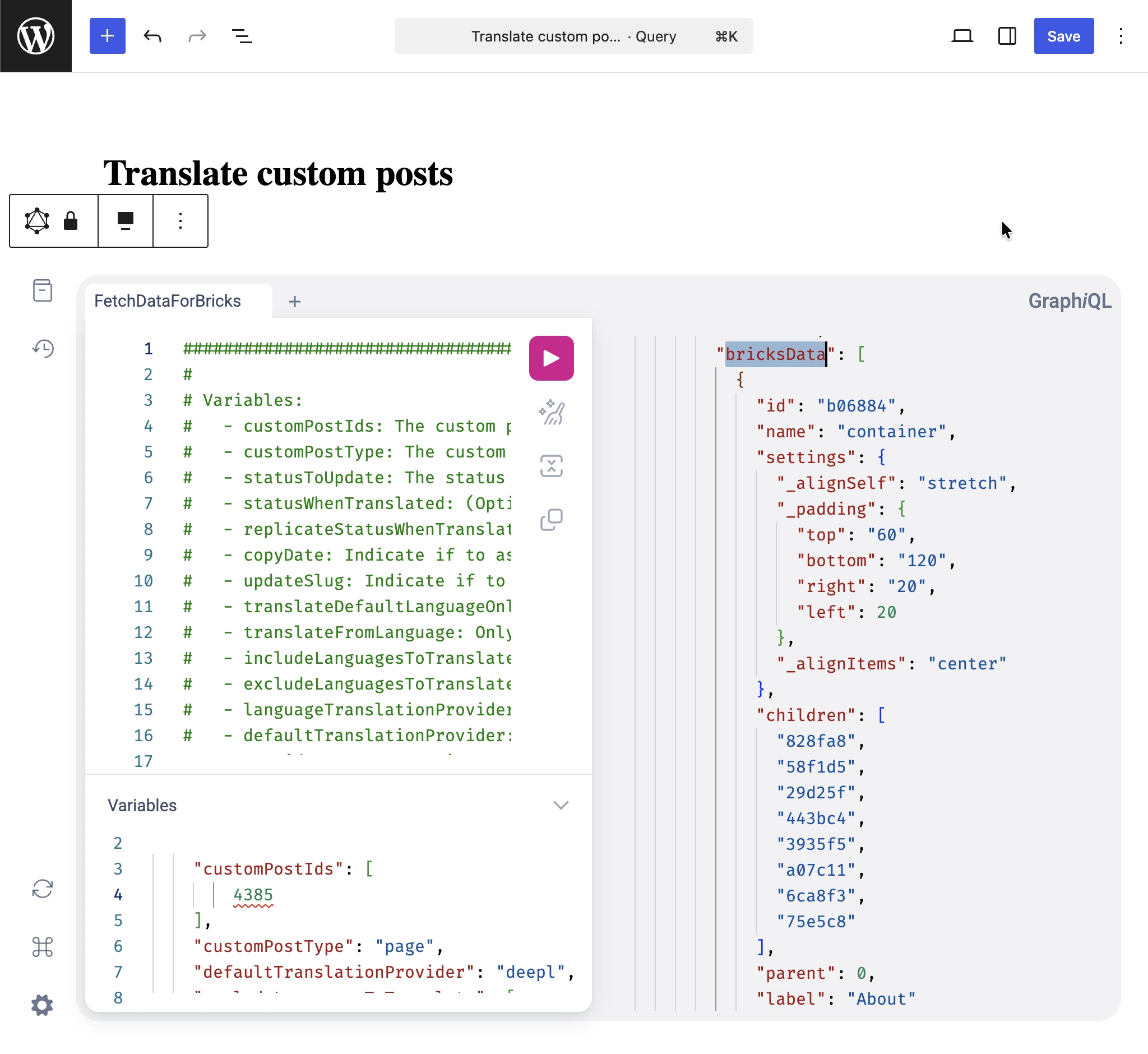
See the Retrieving page builder data to translate guide for how to run that query.
Where to find examples
The plugin's own integrations are a useful reference. Explore this file inside the plugin you installed:
wp-content/plugins/gato-ai-translations-for-polylang/src/ConditionalOnContext/LicenseIsActive/ConditionalOnModule/Bricks/Constants/ElementTypes.php