
Gato AI Translations for Polylang vs WPML
Comparing Gato AI Translations for Polylang as a WPML alternative on translation cost, AI model choice, page builder compatibility, and pricing.


WPML is the longest-established multilingual plugin for WordPress — 15+ years of development, a large ecosystem, and broad compatibility. If you are reading this page, you probably already know it well.
The reason most users start comparing alternatives is cost. WPML's automatic translation runs on a credit system layered on top of the annual license fee. Credits are affordable at low volumes, but the math changes quickly on content-heavy sites — especially when using WPML's own AI engine. This page breaks down exactly what you pay under each model, compares features side by side, and explains how to migrate if you decide to switch.

If you are new to multilingual WordPress and need a big picture overview, read our Comprehensive Guide to Multilingual Translation for WordPress Websites first. It covers the multilingual ecosystem, how plugins like WPML and Polylang work, and the different approaches to AI translation.
Quick comparison
| Feature | Gato AI Translations | WPML |
|---|---|---|
| Translation billing | Your own API key (direct rate, no markup) | Credit system on top of annual license |
| AI providers | ChatGPT, Claude, DeepSeek, Mistral, OpenRouter, DeepL, Google Translate, Ollama | WPML AI (PTC), DeepL, Google Translate, Microsoft |
| Word count limits | None | Yes — credit-based |
| Translation prompt customisation | Yes — full control per language | No |
| Annual plugin price | From $79/year | From €99/year (CMS plan) |
| Add-on required | Yes (Polylang free or Pro) | No |
| Page builder support | Gutenberg, Elementor, Bricks, Etch | Gutenberg, Elementor, Bricks (layout issues documented) |
| WP-CLI bulk translation | Yes | No |
| Self-hosted LLM | Yes | No |
| Translation review workflow | Save as draft before publishing | Full TMS with roles and approval |
| Visual front-end editor | No | Yes (WPML String Translation) |
| Official WPML → Polylang migration tool | Yes (wordpress.org/plugins/wpml-to-polylang) | — |
| Money-back guarantee | 30 days | 30 days |
Why users look for WPML alternatives
Four issues come up consistently in community discussions:
The credit markup. WPML's automatic translation costs credits above the annual license. Those credits mark up the underlying provider's API rate — the gap between what you pay WPML and what the AI provider charges directly is significant. Using WPML's own AI engine (PTC) costs 4 credits per word. DeepL costs 2 credits per word. Microsoft Translator is the cheapest at 1 credit per word. What those credits actually cost in euros depends on your monthly volume tier — covered in the Pricing section below.
Unpredictable spending. Credits can run out at an inconvenient moment: mid-project, mid-launch. Adding more requires navigating the prepaid packages or pay-as-you-go tiers, neither of which is obvious until you hit the ceiling.
Plugin complexity. WPML is a comprehensive plugin suite with a corresponding admin footprint. Teams who already use Polylang and need only AI translation on top of it often find WPML's full feature set to be more than they need.
Page builder breakage. Elementor and Bricks users have documented layout issues when WPML is active — more on this in the Page Builder Compatibility section.
Translation cost: API keys vs credits
Gato AI Translations uses a Bring Your Own Key (BYOK) model. You connect directly to your chosen AI provider — OpenAI, Anthropic, DeepSeek, or others — and pay that provider's published API rate. Gato charges no markup and takes no cut.
Using GPT-5.4 mini (Gato's default model): $0.02 to translate 1,500 words.
| Words translated | Gato API cost |
|---|---|
| 10,000 words | ~$0.13 |
| 50,000 words | ~$0.67 |
| 100,000 words | ~$1.33 |
| 500,000 words | ~$6.67 |
These numbers scale linearly — no tiers, no surprises. Users who choose cheaper models via OpenRouter reduce costs further. Users who self-host a model like Ollama can bring translation costs close to zero.
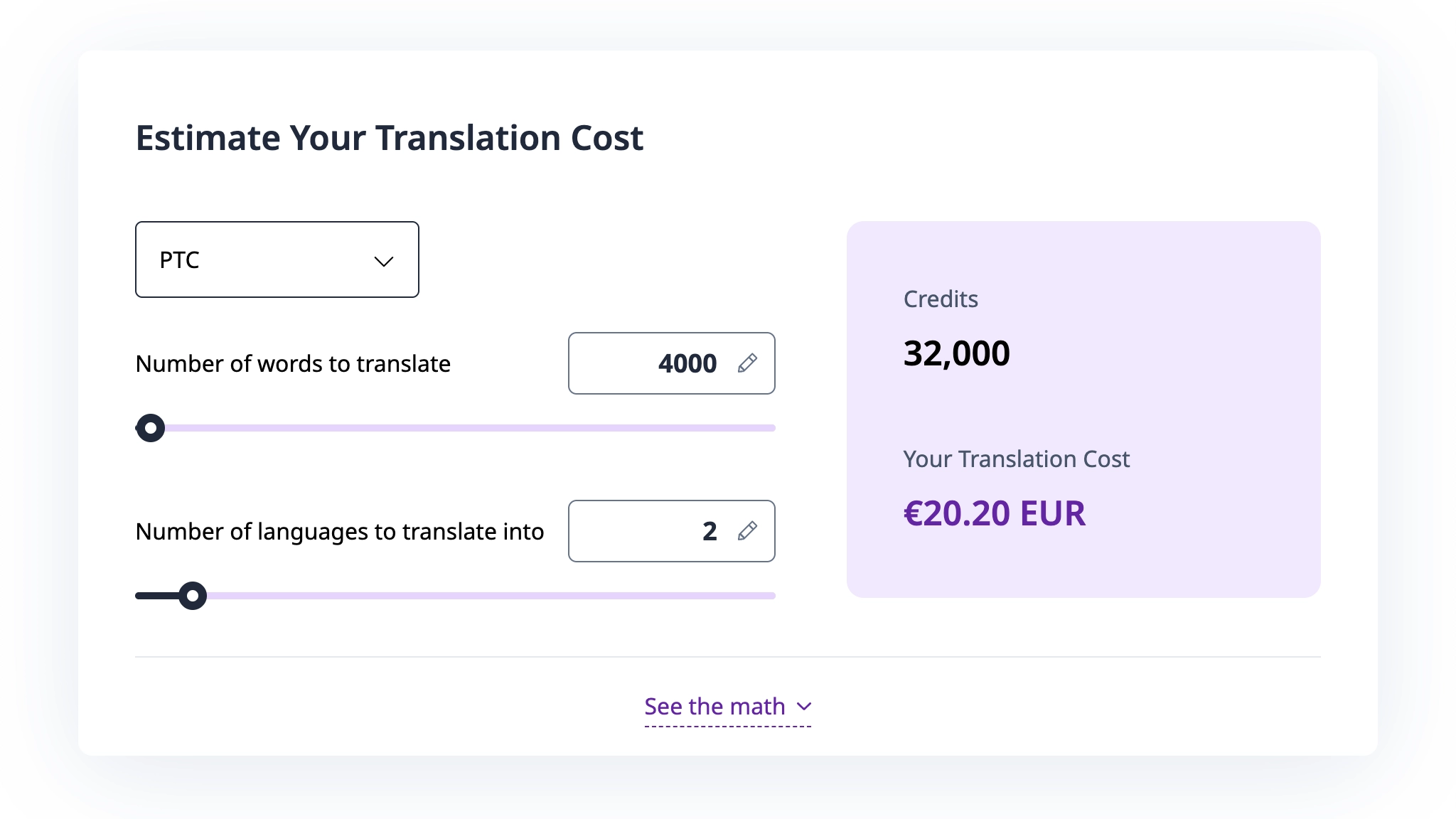
WPML's costs depend on the engine you choose and your monthly volume. Their automatic translation pricing page provides a calculator. As a reference point, WPML's own example shows that translating 4,000 words into 2 languages (8,000 translated words) using their PTC/AI engine costs 32,000 credits, priced at €20.20 at pay-as-you-go rates.
Pricing
Gato AI Translations:
| Plan | Price | Sites |
|---|---|---|
| Personal | $79/year | 1 |
| Business | $99/year | 3 |
| Organisation | $199/year | 10 |
No credit top-ups. No word-count tiers. 30-day money-back guarantee. Free staging site included.
WPML:
| Plan | Price | Sites | Included credits |
|---|---|---|---|
| Multilingual CMS | €99/year | 3 | 90,000 |
| Multilingual Agency | €199/year | Unlimited | 180,000 |
Credits are consumed per translated word, depending on your chosen engine:
| Engine | Credits per word |
|---|---|
| Microsoft Translator | 1 credit |
| Google Translate | 2 credits |
| DeepL | 2 credits |
| WPML AI (PTC) | 4 credits |
Additional credits are available via pay-as-you-go (first 2,000 credits free per month, then €0.75 down to €0.10 per 1,000 credits depending on volume) or prepaid packages (40,000 credits for €50, up to 1,000,000 credits for €800).
Real-world scenario: 10,000-word site translated into 5 languages
That is 50,000 words of translated output in total.
| Gato AI Translations | WPML CMS + DeepL | WPML CMS + AI (PTC) | |
|---|---|---|---|
| Annual license | $79 | €99 | €99 |
| Credits needed | — | 100,000 | 200,000 |
| Credits included with plan | — | 90,000 | 90,000 |
| Additional credits needed | — | ~10,000 | ~110,000 |
| Additional credit cost | $0.67 (API) | ~€6 | ~€62 |
| Estimated year 1 total | ~$79.67 | ~€105 | ~€161 |
The CMS plan's 90,000 included credits cover a 10,000-word site in 5 languages comfortably when using DeepL. The gap widens considerably with WPML's AI engine, and grows further as your content volume increases. Ongoing publishing costs credits each time — Gato's cost with ChatGPT-5.4 mini stays at ~$0.02 per 1,500 words regardless of how much you translate.
AI model flexibility and brand voice
WPML supports three translation engines: its own Private Translate Cloud (PTC) / AI engine, DeepL, and Google Translate. You choose one and apply it globally.
Gato supports: ChatGPT (OpenAI), Claude (Anthropic), DeepSeek, Gemini, Mistral AI, OpenRouter (access to Grok, Llama, and hundreds of other models), DeepL, Google Translate, and self-hosted LLMs via Ollama. You can assign a different provider per language — for example, DeepSeek for Chinese (excellent quality at very low cost), Claude for technical or nuanced content, and GPT-5.4 mini as a reliable default across European languages.
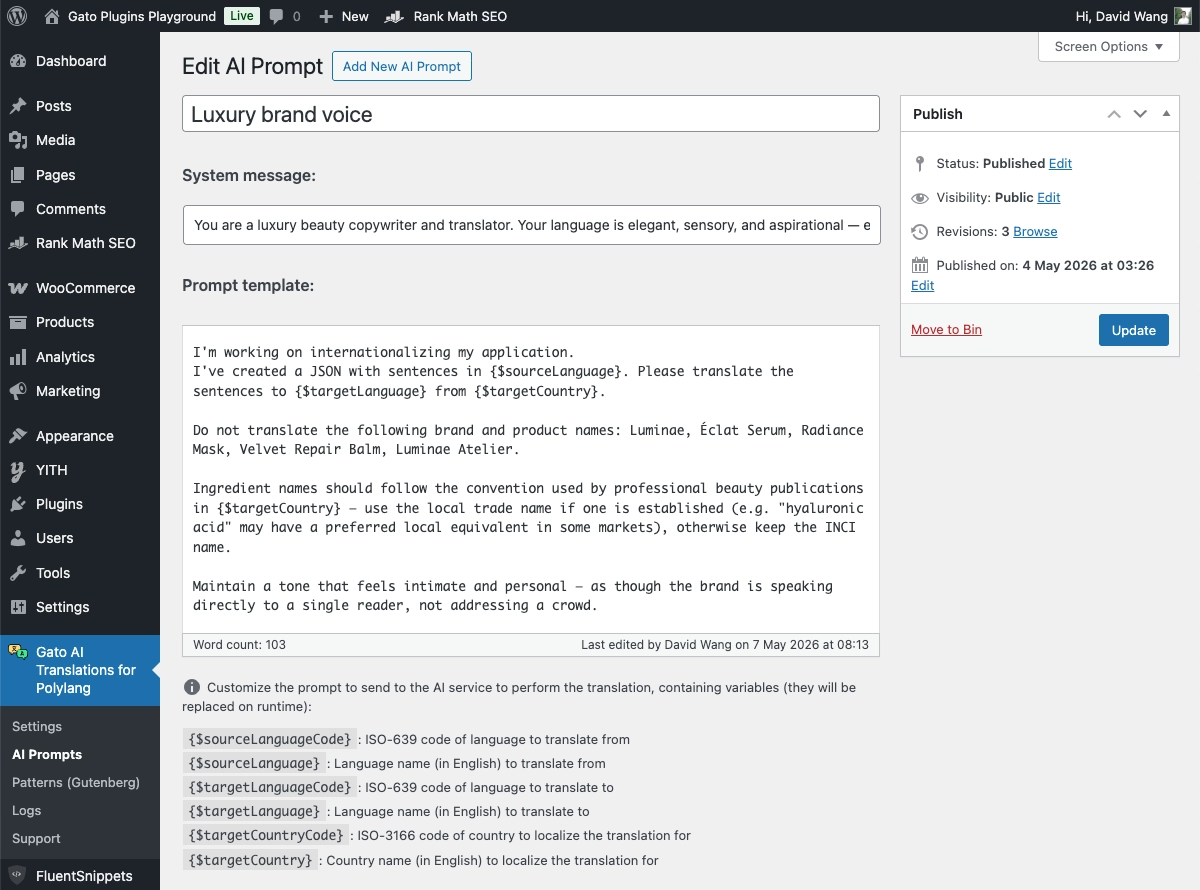
The more significant difference is translation prompt customisation. Gato lets you write a custom prompt for each AI model. This means you can instruct the model to match your exact tone: casual and conversational for a travel blog, formal and precise for legal or financial content, on-brand and consistent for a product catalogue. You can also tell it to never translate specific terms, preserve brand names exactly as written, or adjust sentence structure idiomatically rather than translating literally.
WPML only has basic prompt customization offering 3 fields to ask the name of your website/service/product, description of what the website is about and target audience. While this may be a decision to simplify the user experience, it lacks the flexibility that businesses need to match their brand voice.
Page builder compatibility
Gato's translation is non-destructive: it reads and translates content properties without rewriting the underlying block or widget data structure. This preserves layout integrity across Gutenberg, Elementor, Bricks, and Etch.
WPML users have documented consistent issues across the same builders:
Elementor: The Elementor GitHub repository has open issues specifically documenting WPML conflicts — issue #8612 covers Elementor Theme Builder conflicts, and issue #33180 documents the Elementor editor becoming inaccessible when a language is hidden in WPML. WPML's own support forum contains multiple threads reporting broken layouts on translated Elementor pages, including issues with custom CSS failing to apply and the editor continuously loading.
Bricks: The Bricks community forum documents CSS failing to regenerate on translated pages, font rendering differences between the original and translated versions, and layout changes reverting to the original after translation.
A common root cause: some layout settings are stored in custom fields that WPML's synchronisation does not handle correctly, causing structural data to be dropped or overwritten.
Neither Gato nor WPML guarantees support for every third-party block or widget. Gato covers all core Gutenberg blocks, all core Elementor widgets, and all core Bricks elements. Custom third-party components may require additional integration work in either plugin.
Migrating from WPML to Polylang + Gato AI Translations
The Polylang team maintains an official migration plugin on WordPress.org: WPML to Polylang. It is maintained by Polylang's own developers and has been tested on sites with 9,000+ posts and media items.
What it migrates:
- Language assignments for posts, pages, and custom post types
- Translation relationships and taxonomy translations
- Multilingual nav menus
- WPML string translations
What it does not do: delete your WPML data. Your WPML configuration remains intact until you choose to remove it, giving you a safe rollback point while you verify everything looks correct in Polylang.
A step-by-step switching guide is available on the Polylang website.
Your existing translated content carries over. You are not starting from zero.
After the migration, install Gato AI Translations, connect your API key, and run a bulk translation pass on any content that was added or updated since you last translated. At ~$0.02 per 1,500 words, catching up a large backlog costs very little.
If you are starting a new multilingual site and haven't committed to WPML yet, skip it entirely — start with Polylang (free) and Gato AI Translations from day one.
Which plugin is right for you?
Choose Gato AI Translations if:
- You already use Polylang (free or Pro) and want to add AI translation without changing your multilingual framework
- You want to pay the provider's published API rate directly — no credit markup, no intermediary cost
- Your site has high content volume and you want translation costs to stay predictable as you grow
- You want to customise the translation prompt to match your brand voice, tone, or domain terminology
- You need WP-CLI support for scripted or overnight bulk translation runs
- You are an agency or developer managing multiple sites (Organisation plan: $199/year for 10 sites)
- You want to leverage AI translations but still maintain full content processing within your own infrastructure (with self-hosted Ollama)
- You like cats and want to support a small, independent plugin developer
WPML may be a better fit if:
- You need a standalone multilingual plugin that does not depend on Polylang
- Your workflow requires a full translation management system — assigned translators, per-language approval workflows, and user roles
- You need enterprise compliance documentation or a dedicated support SLA
- Your team is non-technical and needs a fully managed translation experience with no API key setup
Frequently asked questions
Is Polylang a good WPML alternative?
Polylang has over 700,000 active installs and covers all core multilingual functionality: language detection, language switching, URL structures per language, and translated content management. With Gato AI Translations, it gains automatic AI translation across 7+ providers. The main practical difference is that WPML bundles everything in a single plugin suite, while Polylang + Gato is a two-plugin stack that gives you more granular cost control and no credit system.
Does Gato AI Translations work without Polylang?
No — Gato requires Polylang (free or Pro). It is designed to extend Polylang's multilingual layer, not replace it. If your site currently runs WPML, you would migrate to Polylang first using the official migration plugin, then install Gato AI Translation.
Is there a free version of Gato AI Translations?
There is no permanently free live plan. Gato offers a 30-day money-back guarantee and a sandbox environment for testing before committing. The entry plan is $79/year for a single site.
How does translation quality compare?
Gato lets you choose from modern large language models — including GPT-5.4 mini (the default), Claude, and DeepSeek — that understand context, preserve HTML formatting, and handle nuance better than legacy machine translation. Crucially, you can customise the translation prompt to shape tone and protect specific terminology, which WPML does not offer. WPML's DeepL option delivers solid quality for standard content; WPML's own PTC engine is positioned as higher quality but costs 4× the credits of Microsoft Translator and adds significantly to the total cost.
Can I use Gato AI Translations with WooCommerce?
Yes — Gato supports WooCommerce product translation via Polylang. See the WooCommerce translation guide for setup details.
What happens if an AI translation fails mid-batch?
Gato logs every translation attempt. Failed translations are highlighted visually in the wp-admin list views and can be re-triggered individually without spending API credits on entries that already translated successfully. You can also filter the content list to show only failed entries and re-run them as a batch.