
Gato AI Translations for Polylang vs Weglot
Gato AI Translations for Polylang is the best Weglot alternative for WordPress with no word ceiling, better cost structure and data control.


Weglot is a polished, fast-to-deploy multilingual SaaS that works with virtually any platform — WordPress, Shopify, Webflow, Squarespace, and more. If you're on this page, you probably already know why it appealed to you: one-click setup, no plugin conflicts, real AI translation with brand-voice controls, and translations served from a CDN without touching your database. That's a legitimate product with genuine strengths.
The issue that causes users to eventually look for a Weglot alternativeis the pricing ceiling. Weglot's plans are priced by word count and language count simultaneously. A site with three or four active languages and regular content publishing climbs quickly from Business ($32/month, 50K words, 3 languages) to Pro ($87/month, 200K words, 5 languages) and beyond — Advanced runs $329/month. The bill rises with your site's growth, not just its usage. At Pro, you're spending $870/year. At Advanced, $3,290/year. And critically, Weglot's word counts are fixed plan ceilings, not monthly allotments that reset — once you hit your quota mid-cycle you must upgrade to keep translating new content.
Gato AI Translations works on a different model entirely. You pay a flat annual plugin license ($79/year for one site), connect your own AI provider API key, and pay that provider directly at their published rate — no markup, no monthly escalation. At Gato's default model (GPT-5.4 mini), translating 1,500 words costs $0.02. Publish as much as you want, in as many languages as Polylang supports, without upgrading a plan.
One trade-off to name upfront: Gato is WordPress-only and requires Polylang. Weglot works across multiple platforms — if your stack isn't WordPress, Gato isn't an option. This page covers both sides honestly. If WordPress is your platform and you're looking for a Weglot alternative, read on.
If you are new to multilingual WordPress and need a big picture overview, read our Comprehensive Guide to Multilingual Translation for WordPress Websites first. It covers the multilingual ecosystem, how plugins like Weglot and Polylang work, and the different approaches to AI translation.
Quick comparison
| Feature | Gato AI Translations | Weglot |
|---|---|---|
| Translation model | Self-hosted, BYOK (pay-as-you-go API) | Cloud SaaS (monthly subscription) |
| Pricing structure | $79–$199/year flat + API costs | From $170/year based on word and language count |
| Cost for 1,500 words | ~$0.02 (GPT-5.4 mini) | Counted against subscription tier |
| Word count limits | None | Yes — fixed plan ceiling; upgrade required once exhausted |
| Language count limits | None | Yes — Starter 1, Business 3, Pro 5, Advanced 10, Extended up to 20 |
| AI provider choice | ChatGPT, Claude, DeepSeek, Mistral, OpenRouter, DeepL, Google Translate, Ollama | Weglot AI (OpenAI + Gemini — no user choice between them) |
| Per-language provider routing | Yes | No |
| Translation prompt customisation | Raw prompt editor per language | Custom instructions UI (tone, style, audience-level prompts) |
| Glossary | Partial (handled via prompts) | Yes — dedicated glossary UI |
| Data residency | Your server / your AI provider | Weglot's cloud servers |
| Content ownership | Stored in your WordPress database | Stored in Weglot's cloud — translations stop serving if you cancel |
| Polylang required | Yes (free or Pro) | No |
| Setup complexity | Moderate (Polylang + Gato + API key) | Low (one-click) |
| Platform support | WordPress only | WordPress, Shopify, Webflow, Wix, Squarespace, and others |
| WP-CLI bulk translation | Yes | No |
| Self-hosted LLM | Yes (Ollama) | No |
| Money-back guarantee | 30 days | Varies by plan |
Why Weglot's pricing becomes a problem
Weglot's pricing model has two variables working against growing sites at the same time: word count and language count. Add a language and you need a higher tier. Publish more content and you need a higher tier. The two compound.
Here's how the plan ladder looks:
| Plan | Monthly | Annual | Words | Languages |
|---|---|---|---|---|
| Free | — | — | 2,000 | 1 |
| Starter | $17 | $170 | 10,000 | 1 |
| Business | $32 | $320 | 50,000 | 3 |
| Pro | $87 | $870 | 200,000 | 5 |
| Advanced | $329 | $3,290 | 1,000,000 | 10 |
| Extended | $769+ | $7,690+ | 5,000,000 | 20 |
A site with 5 languages is already at Pro ($870/year) before you have published a single word of new content. If you're an agency managing multiple client sites, the math compounds further because Weglot licenses are per-site.
Weglot's Starter and Business plans caps at a single translated language. However, the median e-commerce buyer today is increasingly multilingual and cross-border commerce is the default, not the exception. Two languages may be a reasonable starting point for a small European site. It doesn't make sense for any site with regional or international ambitions. This model doesn't scale, and is designed to push growing sites into higher-priced tiers.
The word count ceiling is the sharper edge. Weglot's allocated words are not a monthly rolling credit — they are a fixed plan-level limit. Once you hit the ceiling mid-cycle, new content stops being translated automatically until you upgrade. There's no temporary extension, no pro-rata top-up at a lower rate. You upgrade or you wait.
Gato AI Translations has no word ceiling and no language ceiling. The $79/year Personal license covers unlimited translation volume on one site. Every API call goes to your AI provider at their published rate. Growth doesn't trigger a plan change.
Translation cost: what you actually pay per word
Gato uses a Bring Your Own Key (BYOK) model. You connect your AI provider's API key and pay that provider's published rate. Gato takes no cut.
The verified cost at Gato's default model: $0.02 to translate 1,500 words with GPT-5.4 mini.
| Words translated | Gato API cost (GPT-5.4 mini) |
|---|---|
| 10,000 words | ~$0.13 |
| 50,000 words | ~$0.67 |
| 100,000 words | ~$1.33 |
| 200,000 words | ~$2.67 |
| 500,000 words | ~$6.67 |
| 1,000,000 words | ~$13.33 |
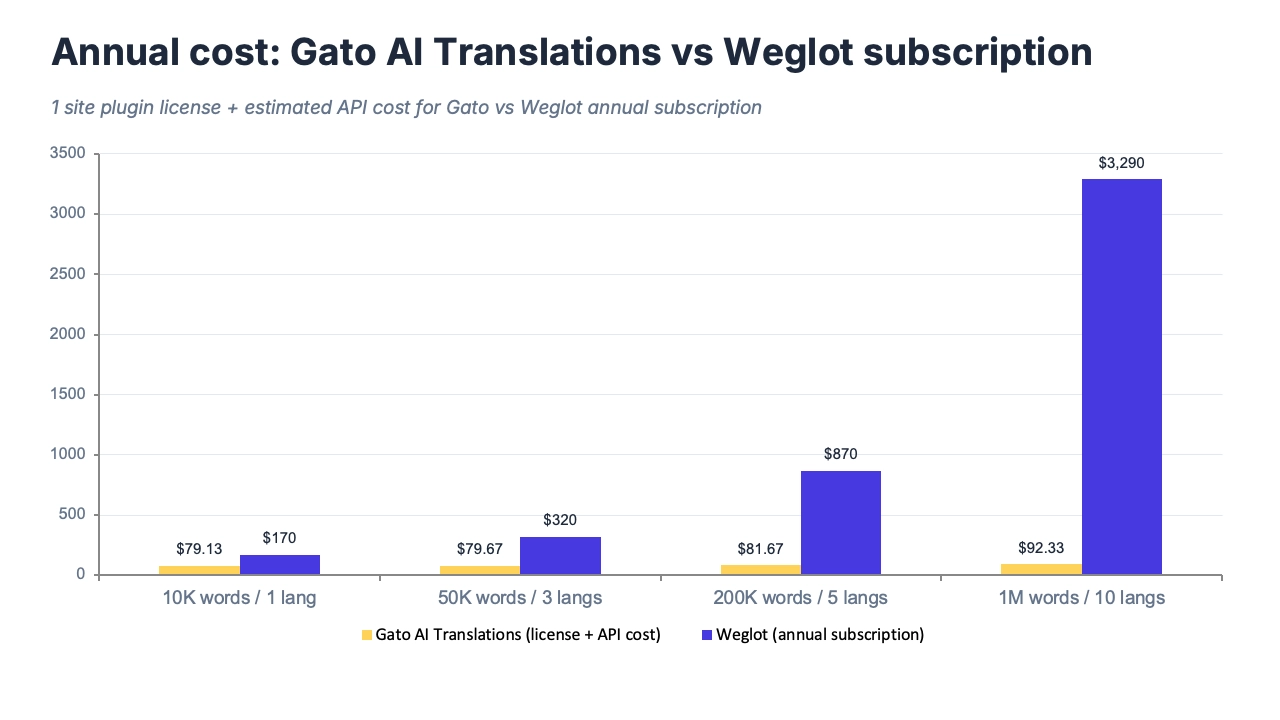
These numbers scale linearly. No volume thresholds. No overage surcharges. Weglot's Pro plan ($870/year) covers up to 200,000 translated words. The same 200,000 words via Gato + GPT-5.4 mini: ~$2.67 in API costs plus $79 for the plugin license — a year-one total of ~$82. That is the core cost difference at this volume level, and it is significant.
Users who route through cheaper models via OpenRouter — DeepSeek or Mistral, both with strong multilingual quality — reduce costs further. Users who self-host a model via Ollama bring translation costs effectively to zero beyond electricity and hardware. Weglot has no equivalent to either option: the model is bundled.
This is the primary reason Gato is the cheapest WordPress translation plugin for content-heavy or multi-language sites. The gap is not marginal at scale.
Pricing
Gato AI Translations:
| Plan | Price | Sites |
|---|---|---|
| Personal | $79/year | 1 |
| Business | $99/year | 3 |
| Organisation | $199/year | 10 |
No word limits. No language limits. No monthly fees. 30-day money-back guarantee. Free staging site included. API costs are paid directly to your chosen AI provider at their published rates — no markup.
Weglot (verify weglot.com for current rates):
| Plan | Monthly | Annual | Words | Languages |
|---|---|---|---|---|
| Free | — | — | 2,000 | 1 |
| Starter | $17 | $170 | 10,000 | 1 |
| Business | $32 | $320 | 50,000 | 3 |
| Pro | $87 | $870 | 200,000 | 5 |
| Advanced | $329 | $3,290 | 1,000,000 | 10 |
| Extended | $769+ | $7,690+ | 5,000,000 | 20 |
Real-world scenario: 10,000-word site translated into 5 languages
10,000 source words × 5 target languages = 50,000 total translated words. Five languages requires Weglot's Pro tier.
| Gato AI Translations | Weglot | |
|---|---|---|
| License / subscription (year 1) | $79 (Personal) | $870/year (Pro — required for 5 languages) |
| API/translation costs for 50,000 words | ~$0.67 | Included in subscription |
| Estimated year 1 total | ~$79.67 | ~$870 |
| Year 2 and beyond | $79 + ongoing API costs | $870/year (same rate, or higher if content grows) |
At 1–2 languages on a small site, Weglot's Starter tier ($170/year) is a reasonable spend, especially given how little setup it requires. The gap widens sharply as language count crosses 3 and as content volume grows. Adding a sixth language with Weglot means staying on Pro; with Gato it means nothing — Polylang supports it at no additional cost.
Gato's year-two cost is identical to year one: $79 plus API usage. There is no subscription escalation, no plan renewal that prices you up, and no penalty for growth.
AI translation flexibility and brand voice
Weglot's AI Language Model is a real, well-designed feature — worth acknowledging clearly. It accepts custom instructions for tone (casual, formal, technical, informational), audience-level prompts, brand guidelines, and supports a dedicated glossary UI for terms you never want translated. Under the hood it uses OpenAI and Gemini. For non-technical users who want polished AI translation with a clean interface and no API configuration, it delivers.
The honest differences are one level upstream of the prompt UI.
Provider choice. Weglot picks whether OpenAI or Gemini handles a given translation — you configure the style, not the engine. Gato lets you choose the provider directly: ChatGPT (OpenAI), Claude (Anthropic), DeepSeek, Gemini, Mistral AI, OpenRouter (access to Grok, Llama, and hundreds of other models), DeepL, Google Translate, and self-hosted LLMs via Ollama. You can assign a different provider per language — DeepSeek for Chinese (excellent quality at very low cost), Claude for nuanced technical content, GPT-5.4 mini as a reliable default across European pairs. No Weglot equivalent.
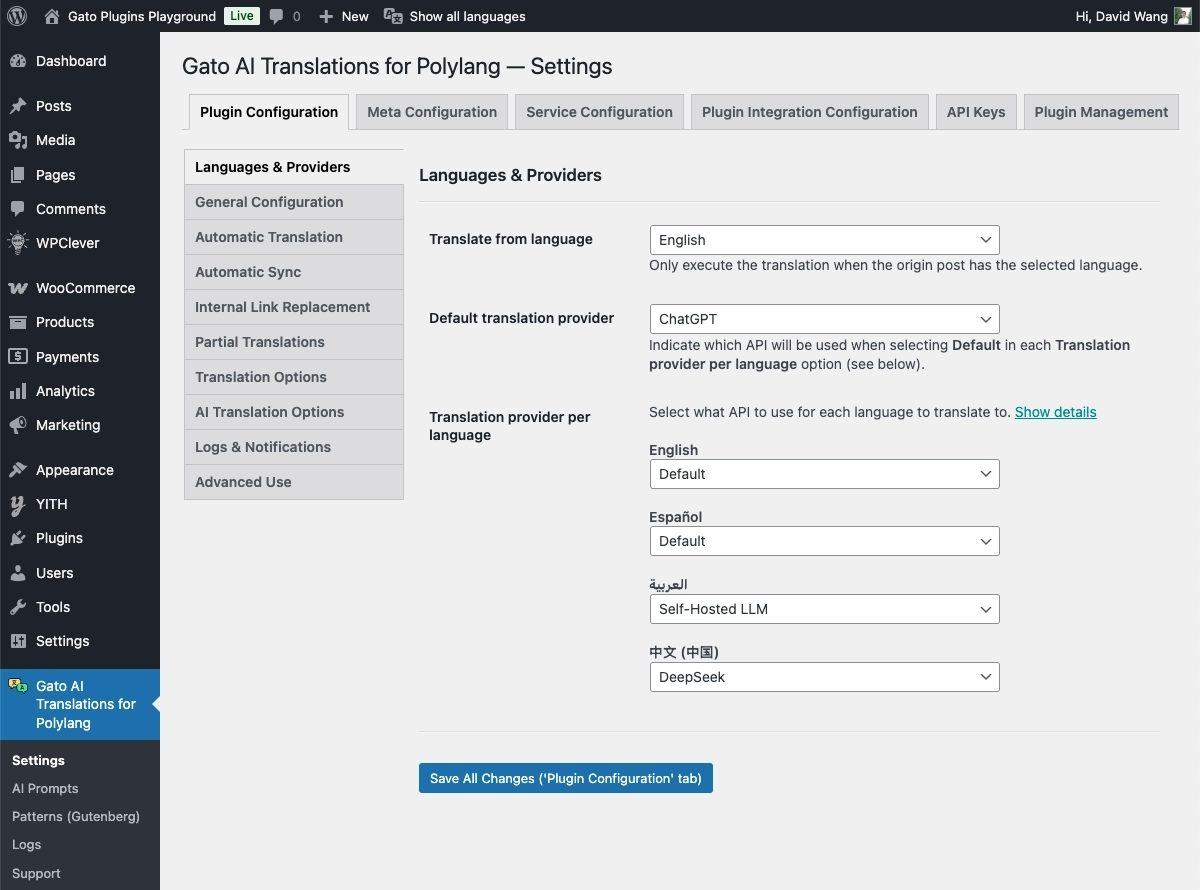
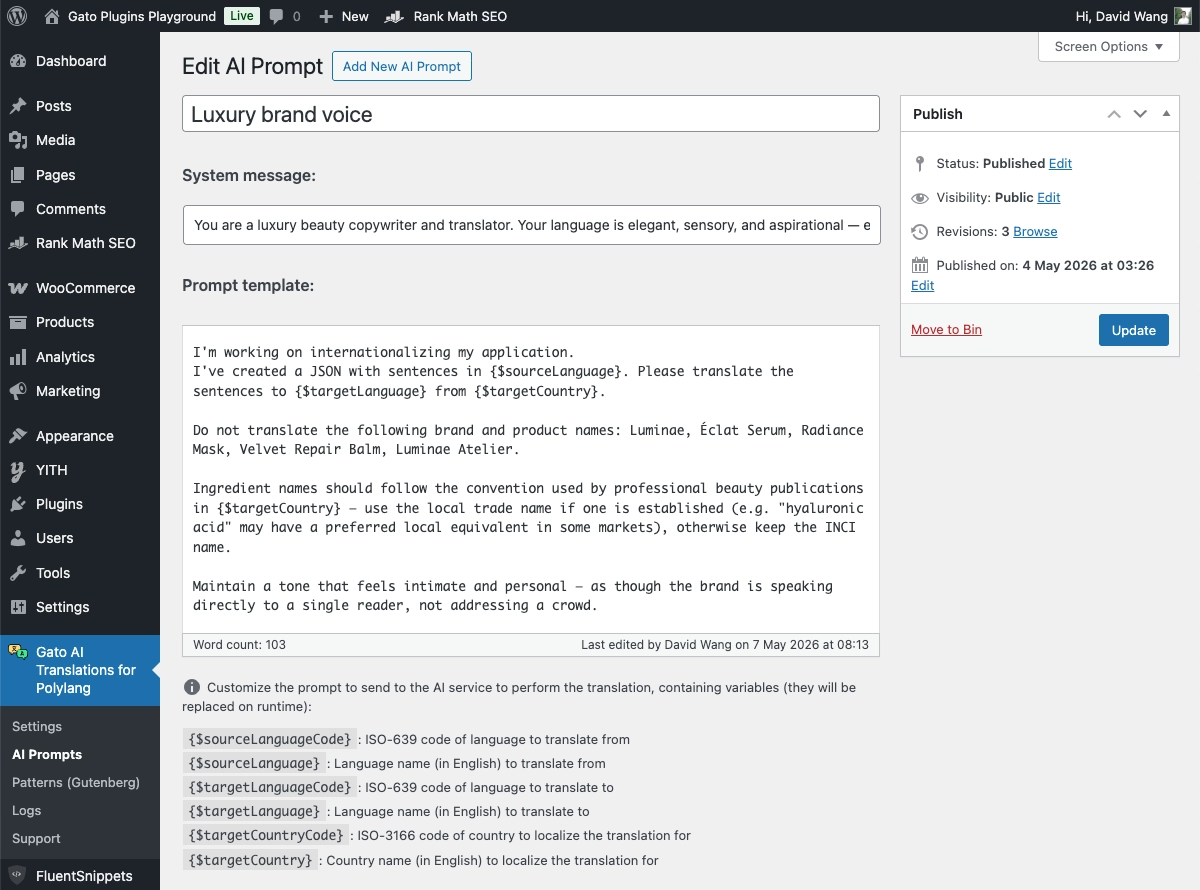
Raw prompt access. Weglot's custom instructions UI is an abstraction over the prompt — you describe your tone and style, and Weglot structures the model call. Gato's prompt editor is raw: you write the system prompt the model sees, per language. That means you can be precise about terminology ("never translate the brand name GatoPress"), structural preferences ("translate idiomatically, not literally"), or content-type rules ("use formal register for product descriptions, informal register for blog posts"). For agencies with complex client brand requirements, the raw prompt is meaningfully more powerful.
Glossary. Weglot's dedicated glossary UI is a genuine edge over Gato. You add terms and their translations directly in a table — clean, visual, no prompt engineering needed. Gato handles glossary-like behaviour via prompts ("do not translate the following terms: X, Y, Z"), which is more flexible for complex rules but less approachable for non-technical users. This is one area where Weglot is the better fit for non-developer workflows.
Future-proofing. Because Gato supports any OpenRouter model, users gain access to new models on the day they're released, without waiting for a plugin update. Weglot's model support depends on Weglot's release cycle.
Self-hosted vs cloud: who owns your content?
This is the architectural difference that matters most for sites concerned about data residency, GDPR compliance, or long-term platform independence.
Weglot is a cloud service. Your WordPress content is sent to Weglot's servers for translation processing and served from their CDN. The translated content lives in Weglot's infrastructure, not your WordPress database.
The practical consequence: if you cancel your Weglot subscription, your translated content stops being served. Visitors from other languages see your source-language content. Translated pages that were indexed by search engines are progressively de-indexed. Weglot offers a CSV or XLIFF export of your translations, but only on the Advanced plan and higher — and the exported format does not import directly into Polylang or any other translation plugin. You can use it as a reference, not as a migration path.
Gato is entirely self-hosted. Translations are stored in your own WordPress database via Polylang. Your translated content is yours. Cancel Gato tomorrow — the translations remain on your site permanently, served normally, indexed by search engines without interruption.
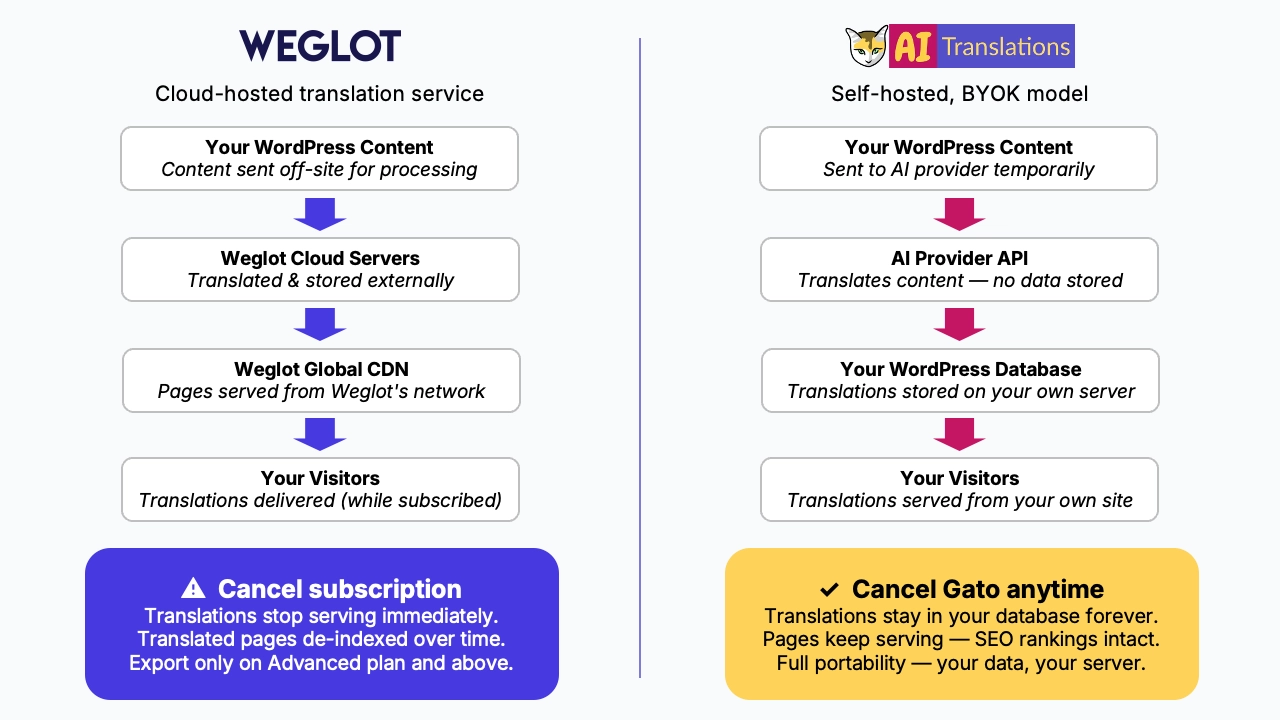
One nuance: Gato does send content to your chosen AI provider (OpenAI, Anthropic, etc.) for translation. This is the same data-exposure model as any BYOK API integration and should be disclosed to clients on data-sensitive projects. For users who need full data sovereignty — where content never leaves their own infrastructure — Ollama with a self-hosted LLM resolves this entirely. No Weglot equivalent.
For GDPR-conscious organisations in the EU: both Weglot and the major AI providers (OpenAI, Anthropic) offer Data Processing Agreements. Self-hosted Ollama eliminates the third-party data question entirely.
Switching from Weglot to Polylang + Gato AI Translations
There is no dedicated Weglot-to-Polylang migration plugin. Weglot stores your translations in its own cloud, not in your WordPress database, so there is no automated import path into Polylang.
What Weglot does offer: a CSV or XLIFF export of your translated content from the Weglot dashboard — but only on Advanced-tier plans and above. If you're on a lower plan, you won't have access to this export. Even where available, the export format does not import directly into Polylang. You can use it as a human reference during post-translation review, not as a migration shortcut.
The practical solution is a fresh translation pass with Gato. This sounds like a significant undertaking until you look at the cost: 100,000 words costs ~$1.33 in GPT-5.4 mini API fees and can run overnight via WP-CLI. For most sites, the re-translation job costs less in API fees than a single month of Weglot's Pro subscription.
If you used Weglot's custom instructions for brand voice or built up a glossary in the Weglot dashboard, use those as the starting point for Gato's per-language system prompts. Your Weglot custom instructions translate directly into prompt language — "use a casual, conversational tone" becomes exactly that in Gato's prompt editor.
High-level migration steps:
- Back up your site fully before making any changes.
- Note down your Weglot custom instructions and glossary entries — these seed your Gato prompts.
- Export your translations from the Weglot dashboard (Advanced plan and above) as a review reference.
- Install Polylang (free) and configure your languages.
- Deactivate and remove Weglot — your site reverts to its source language for visitors at this point. Plan for low-traffic hours.
- Install Gato AI Translations, connect your AI API key, and configure per-language prompts using your Weglot instructions as a starting point.
- Run bulk translation across all content via wp-admin bulk actions or WP-CLI.
- Review key pages (homepage, landing pages, product pages) and publish.
The technical migration can typically be completed in a single working session. Content review time depends on your site's size and how closely the automated output matches your brand standards.
Which plugin is right for you?
Choose Gato AI Translations if:
- You're on WordPress and willing to add Polylang as your multilingual framework
- You want a predictable, low annual cost regardless of how much content you translate or how many languages you add
- You want to own your translations — stored in your WordPress database, fully portable, not dependent on an active subscription to serve
- You want to choose your AI provider and route per-language (Claude for nuanced content, DeepSeek for cost-sensitive pairs, Ollama for full data sovereignty)
- You want raw, per-language prompt control rather than a wrapped tone-instructions UI
- You need WP-CLI support for large-scale, overnight, or scripted translation workflows
- You want to leverage AI translations but still maintain full content processing within your own infrastructure (with self-hosted Ollama)
- You like cats and want to support a small, independent plugin developer
Weglot may be a better fit if:
- Your site isn't on WordPress — Weglot supports Shopify, Webflow, Wix, Squarespace, and others; Gato is WordPress-only
- You want zero-configuration setup with no API keys, no Polylang, and no provider decisions
- You want Weglot's polished glossary UI and wrapped tone-instructions interface — it's genuinely well-designed for non-technical users
- You want translations served from a CDN without adding load to your WordPress database
- Your word volume and language count fit comfortably within a single plan tier, and you don't expect significant growth
- A non-technical team manages translations and needs everything in one clean dashboard with no plugin configuration
Frequently asked questions
Is there a free Weglot alternative for WordPress?
Gato AI Translations doesn't have a permanently free plan, but its $79/year entry price is dramatically lower than Weglot's monthly subscription at any tier above Starter. The actual translation cost via Gato — using your own API key — runs about $0.02 per 1,500 words, making it the cheapest WordPress translation plugin at meaningful content volumes. Weglot's free tier (2,000 words, 1 language) exists but is only suitable for the smallest sites. Gato offers a 30-day money-back guarantee if it isn't the right fit.
Does Gato work with any WordPress theme?
Yes — Gato works with any theme compatible with Polylang. Polylang has 800,000+ active installs and is one of the most widely compatible multilingual plugins in the WordPress ecosystem.
Do I lose my Weglot translations if I switch?
Yes — Weglot translations live in Weglot's cloud, not your WordPress database. When you deactivate Weglot, those translations stop being served and translated pages are progressively de-indexed by search engines. You can export translations as CSV or XLIFF from the Weglot dashboard (Advanced plan and above) as a human reference, but there is no automated import path into Polylang. You'll need to re-translate with Gato — at ~$0.02 per 1,500 words, re-translating a 100,000-word site costs about $1.33 in API fees.
Can Gato handle as many languages as Weglot?
Yes — Gato via Polylang supports all major world languages with no plan-level language cap. Weglot restricts language count by plan tier: Starter allows 1, Business 3, Pro 5, Advanced 10, Extended up to 20. With Gato, adding a new language costs nothing at the plugin level — you pay only the API cost of translating the content.
Doesn't Weglot already let me customise the translation tone and brand voice?
It does — Weglot's AI Language Model accepts tone instructions, brand guidelines, and a glossary, which are genuine, well-designed features. The differences with Gato are at the provider level: Gato lets you choose the AI model (Claude, DeepSeek, Mistral, OpenRouter, Ollama, etc.) and route per-language, and exposes the raw system prompt rather than a wrapped instructions UI. Weglot's glossary UI is friendlier for non-technical users. Gato's raw prompt gives technically capable teams more precise control over model behaviour. Neither is strictly better — it depends on your workflow.
Does Gato require technical knowledge to set up?
Gato's setup involves installing Polylang, installing the Gato plugin, and pasting an API key from your chosen AI provider. For developers, this is trivial. For non-technical site owners, Gato's documentation covers it step by step — it's a one-time 15-minute task. Weglot's one-click setup is genuinely simpler; that's an honest advantage. Once Gato is running, day-to-day translation requires no technical involvement.