
Gato AI Translations for Polylang vs TranslatePress
Gato AI Translations for Polylang is the best TranslatePress alternative with unlimited word quota, multiple AI models, and bulk translation.


TranslatePress is one of the most popular WordPress multilingual plugins — 400,000+ active installs and a genuinely well-designed product. Its standout feature is a visual front-end editor where you click on any page element and translate it in context, seeing exactly how it looks before publishing. For small sites and non-technical teams, that workflow is hard to beat.
The reason most users start looking for TranslatePress alternatives is the word quota. Every TranslatePress premium plan bundles automatic AI translation as an annual word allowance: 50,000 words on Personal, 200,000 on Business, 500,000 on Developer. Once you exhaust the allocation mid-year, automatic translation pauses until you buy a word pack (€24 for 100K words, €40 for 200K, scaling to ~€600 for 5M) or wait for your next renewal.
Gato AI Translations works differently. You connect your own AI provider API key and pay that provider's published rate directly — no markup, no quota, no top-up packs. At Gato's default model (GPT-5.4 mini), translating 1,500 words costs $0.02. There is no annual ceiling.
One structural difference to note upfront: Gato is built on top of Polylang. If you're already using Polylang, Gato slots in directly. If you're not, adopting Polylang is part of the switch — covered in the migration section below. If you're evaluating both products as a TranslatePress alternative and as the best WordPress translation plugin for your workflow, the sections below break down every meaningful difference.
If you are new to multilingual WordPress and need a big picture overview, read our Comprehensive Guide to Multilingual Translation for WordPress Websites first. It covers the multilingual ecosystem, how plugins like TranslatePress and Polylang work, and the different approaches to AI translation.
Quick comparison
| Feature | Gato AI Translations | TranslatePress |
|---|---|---|
| Translation billing | BYOK — pay-as-you-go via your own API key | Plan-bundled annual word quota |
| Annual plugin price | $79–$199/year | €99–€249/year |
| Word count limits | None | Yes — 50K / 200K / 500K AI words per year; unused carry over |
| AI providers | ChatGPT, Claude, DeepSeek, Mistral, OpenRouter, DeepL, Google Translate, Ollama | Managed engine routing between Gemini, GPT, DeepL, and Google Translate |
| Translation prompt customisation | Yes | No |
| Per-language provider routing | Yes | No |
| Cost for 1,500 words | ~$0.02 (GPT-5.4 mini) | Counted against annual quota |
| Visual front-end editor | No (bulk editor in wp-admin) | Yes — translate in context on the live page |
| Bulk translate from wp-admin | Yes — multi-select bulk action | Limited — workflow centred on the visual editor |
| WP-CLI bulk translation | Yes | No |
| Self-hosted LLM | Yes (Ollama) | No |
| Page builder support | Gutenberg, Bricks, Elementor, Etch, Classic Editor | Gutenberg, Elementor, Divi, Bricks (with caveats) |
| Free version | No (30-day money-back guarantee) | Yes — manual translation + 2,000 AI words to trial automatic translation |
| Money-back guarantee | 30 days | 15 days |
Word quotas vs unlimited translations
This is the most common switching trigger for TranslatePress users, so it is worth being specific about how the quota model works and where it becomes a constraint.
Every TranslatePress premium plan includes a yearly AI-word allowance that resets at license renewal. Unused words carry over as long as the license stays active — that is a genuinely fair feature and worth acknowledging. But the ceiling is real, and it becomes a problem in three predictable situations: site owners migrating large content catalogues, agencies running multiple client sites against one license, and publishers adding content aggressively across several languages.
Once you exhaust the annual allocation, automatic translation pauses. Your options are a word top-up pack (€24 for 100K, €40 for 200K, €120 for 1M, up to ~€600 for 5M) or waiting for renewal. Neither option is unreasonable, but both add friction and cost when you need to move quickly.
It's also worth noting that you generally need more words than you think. TranslatePress also translates settings, slugs, categories, tags, and other taxonomies so the total word count can grow beyond just the post content.
A concrete example: migrating a 200,000-word site into 3 target languages produces 600,000 translated words. That exceeds the Developer plan's 500,000-word annual allocation — you'd need a top-up to complete the job. With Gato, the same job runs through a single WP-CLI session at ~$8 in API costs.
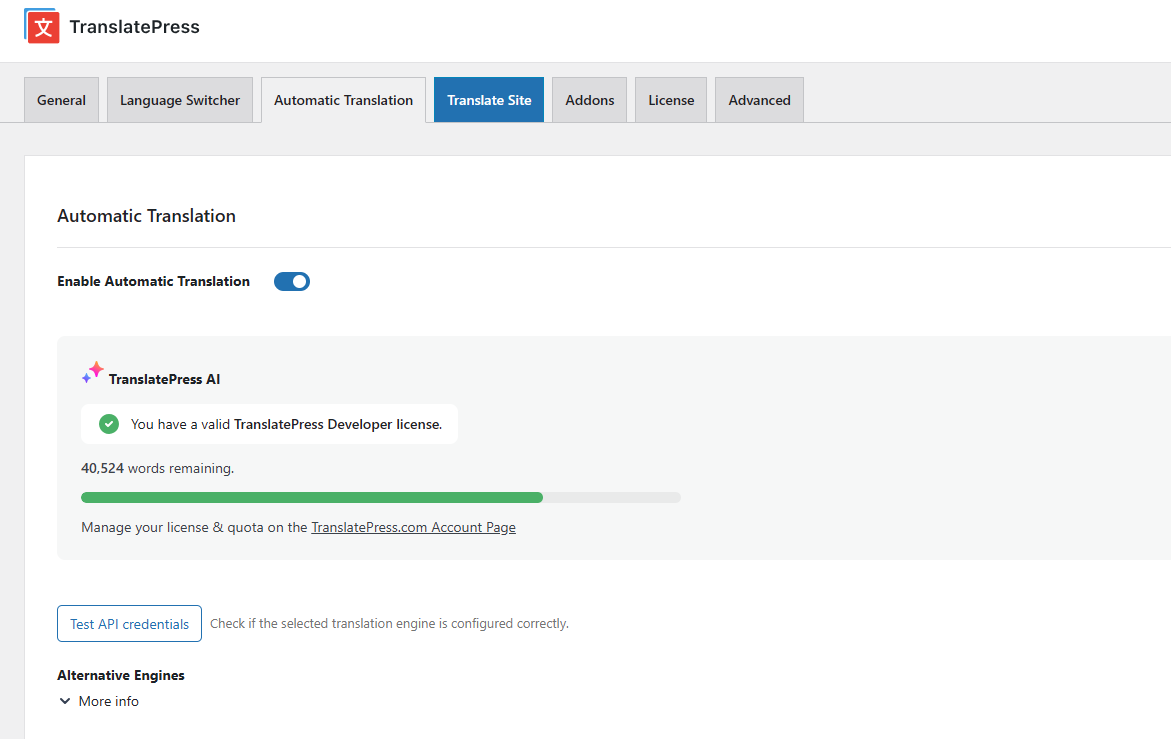
There is no quota with Gato AI Translations for Polylang. Every API call goes directly to your provider at their published rate. The only ceiling is your AI provider's rate limits, which can be raised on request by contacting the provider.
There is a secondary difference worth noting. TranslatePress AI is a managed LLM-backed service that routes automatically between Gemini, GPT, DeepL, and Google Translate. That is a genuine strength: zero configuration, no API keys required, just activate and translate. The trade-off is opacity. You cannot see which engine handled a given page, cannot choose Claude for nuanced English-to-Japanese, cannot route DeepSeek for cost-sensitive Chinese content, and cannot adopt a new model the day it is released. Gato AI Translations gives you that control directly.
Translation cost breakdown
Gato AI Translations uses a Bring Your Own Key (BYOK) model. You connect your chosen AI provider's API key and pay that provider's published rate. Gato charges no markup.
The cost of translation with Gato AI Translations: $0.02 to translate 1,500 words with the default model (GPT-5.4 mini).
| Words translated | Gato API cost (GPT-5.4 mini) |
|---|---|
| 10,000 words | ~$0.13 |
| 50,000 words | ~$0.67 |
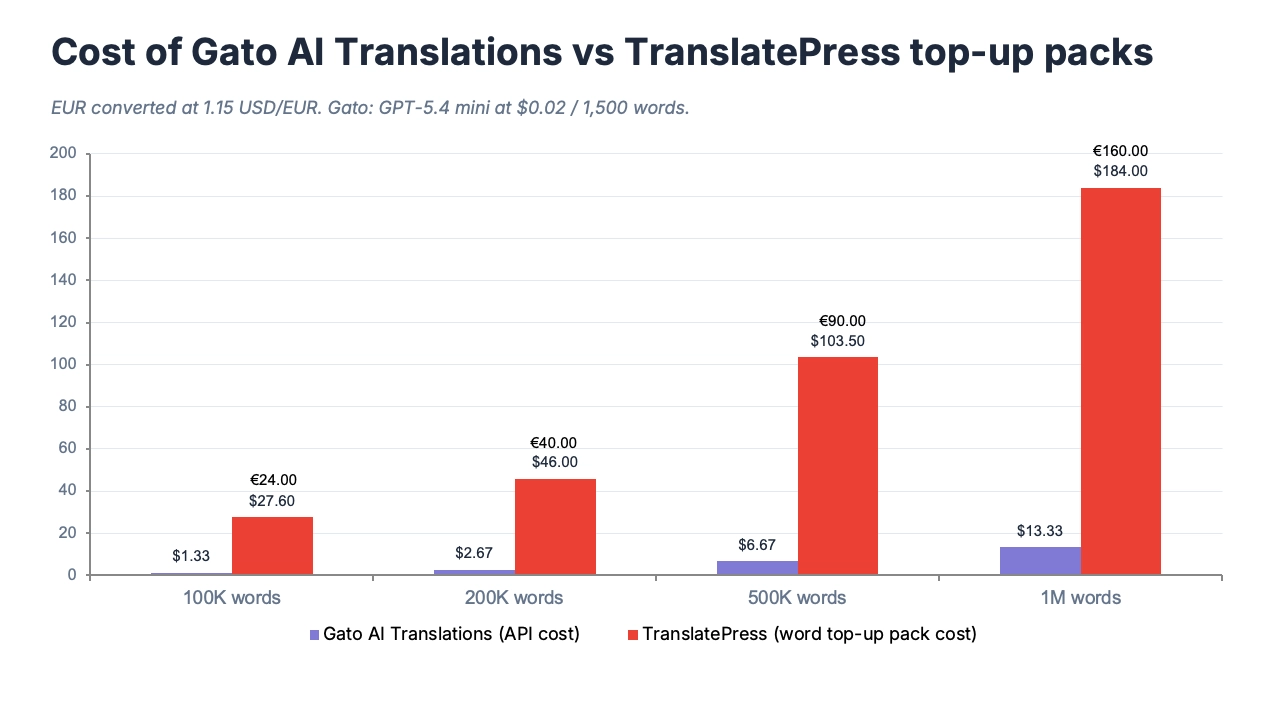
| 100,000 words | ~$1.33 |
| 500,000 words | ~$6.67 |
| 1,000,000 words | ~$13.33 |
These numbers scale linearly with no tiers or volume thresholds. Users who route through cheaper models via OpenRouter — DeepSeek or Mistral — reduce costs further while still getting strong translation quality. Users who self-host a translation model via Ollama can bring API costs close to zero.
For comparison, TranslatePress's word top-up packs: 100,000 words for €24 (~$28), 200,000 for €40 (~$46), 1,000,000 for €160 (~$184), 5,000,000 for €650 (~$747). The same 100,000 translated words via GPT-5.4 mini through Gato costs ~$1.33 — roughly 1/20th the price of a TranslatePress top-up at that volume. This is the most direct reason Gato AI Translations is often the cheapest WordPress translation plugin for content-heavy sites.
DeepSeek via OpenRouter is significantly cheaper than GPT-5.4 mini, with strong multilingual quality — particularly for Chinese. TranslatePress AI does not expose model selection, so you cannot route cheaper alternatives for cost-sensitive language pairs. In other words, you cannot choose DeepSeek for Chinese content and GPT-5.4 mini for European languages with TranslatePress, but you can with Gato AI Translations.
Pricing
Gato AI Translations:
| Plan | Price | Sites |
|---|---|---|
| Personal | $79/year | 1 |
| Business | $99/year | 3 |
| Organisation | $199/year | 10 |
No credit top-ups. No word-count tiers. 30-day money-back guarantee. Free staging site included. API costs are paid directly to your AI provider at their published rates.
TranslatePress (billed annually, in EUR):
| Plan | Price | Sites | Annual AI words |
|---|---|---|---|
| Personal | €99/year | 1 | 50,000 |
| Business | €199/year | 3 | 200,000 |
| Developer | €249/year | Unlimited | 500,000 |
Unused AI words carry over each year while the license stays active. The free version includes manual translation plus 2,000 AI words to trial automatic translation — a legitimate option for very small sites.
Real-world scenario: 10,000-word site translated into 5 languages
10,000 source words × 5 target languages = 50,000 total translated words.
| Gato AI Translations | TranslatePress Personal | |
|---|---|---|
| License cost (year 1) | $79 | €99 — covers the 50K word job exactly |
| Cost for 50,000 translated words | ~$0.67 (GPT-5.4 mini API) | Included — but consumes the entire annual quota |
| Estimated year 1 total | ~$79.67 | €99 (~$108) |
| Re-translating after a redesign | ~$0.67 | Buy a 100K word pack (€24), or upgrade to Business |
At this exact volume on the Personal plan, TranslatePress is not dramatically more expensive — that is an honest read of the numbers. The gap widens quickly when you add languages, publish frequently, or manage multiple sites. A 200,000-word site in 3 languages = 600,000 translated words, which exceeds even the Developer plan's annual allocation. Gato's API cost for the same job: ~$8.
TranslatePress also offers free version covers manual translation plus 2,000 AI words to test automatic translation. This is a legitimate option for tiny sites, although it is mainly a low-friction way to evaluate the product.
AI model choice and brand voice
TranslatePress AI is a managed service that routes automatically between Gemini, GPT, DeepL, and Google Translate under the hood — picking what its engine considers best for each language pair. That is an advantage for teams who want zero configuration: no API key setup, no model decisions, just activate and translate.
The trade-off is opacity and lock-in. You cannot choose which engine handles a given page, cannot adopt a newer or cheaper model when one becomes available, and cannot route different providers for different language pairs.
Gato's supported providers: ChatGPT (OpenAI), Claude (Anthropic), DeepSeek, Gemini, Mistral AI, OpenRouter (access to Grok, Llama, and hundreds of other models), DeepL, Google Translate, and self-hosted LLMs via Ollama. You can configure a different provider per language — for example, DeepSeek for Chinese (excellent quality at very low cost), Claude for technically complex or nuanced content, and GPT-5.4 mini as a reliable default across European languages. Because Gato supports any OpenRouter model, you gain access to newly released models without waiting for a plugin update.
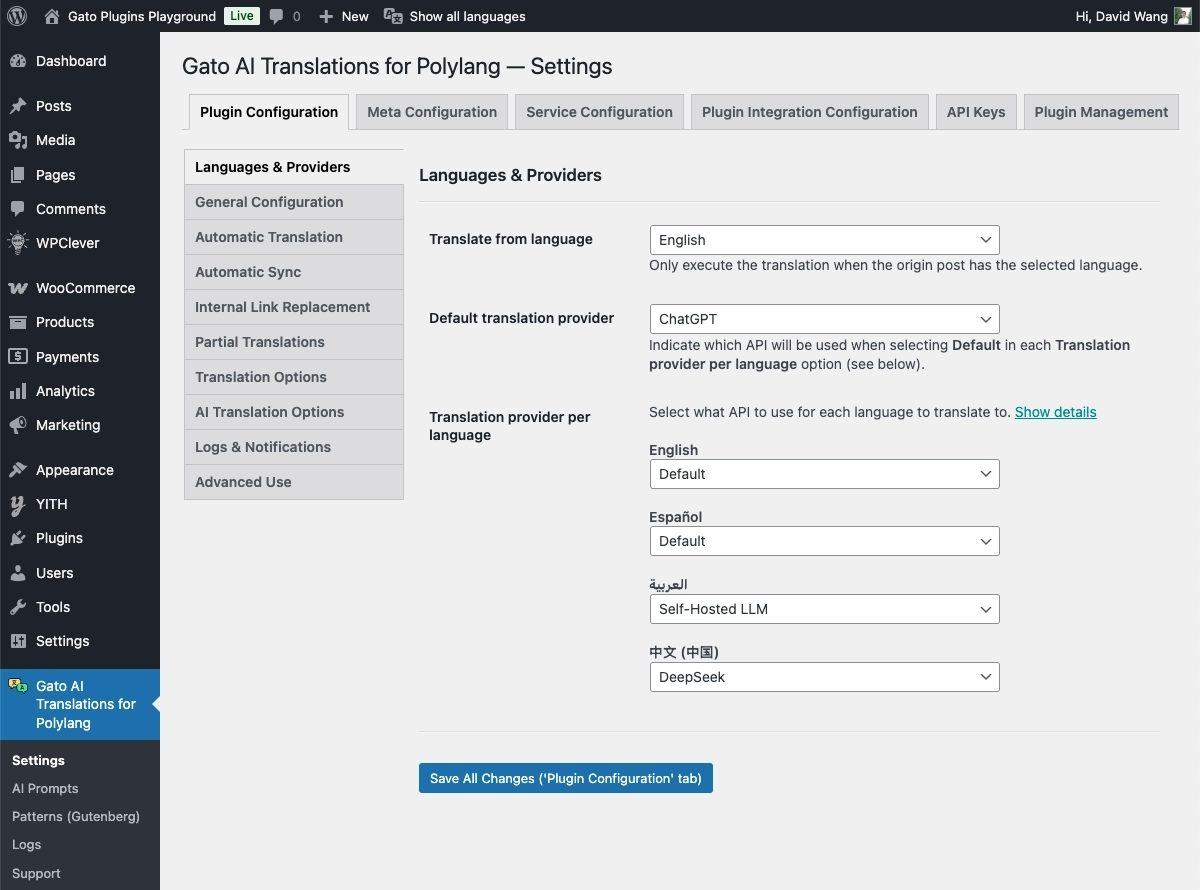
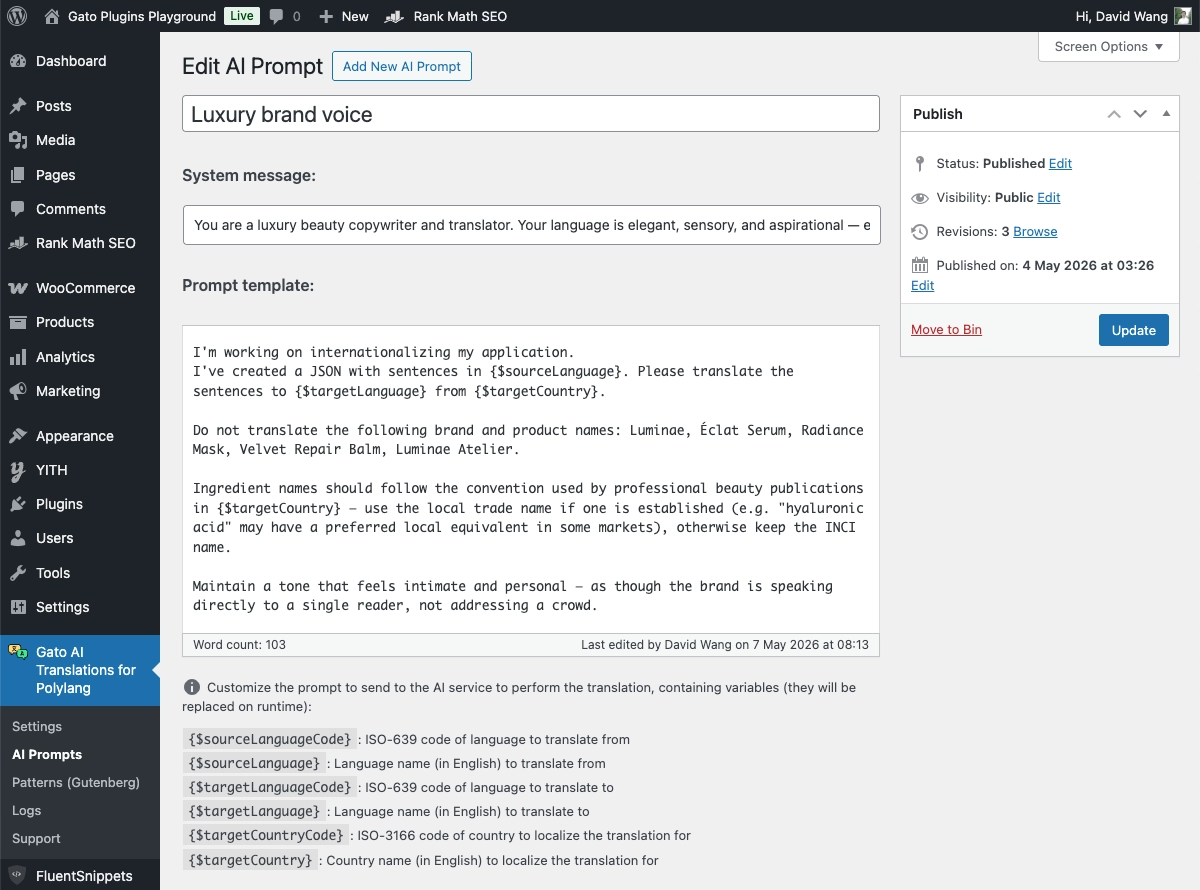
The more significant differentiator is translation prompt customisation. Gato AI Translations is the only TranslatePress alternative that lets you write a fully custom system prompt for your specific situation. You can instruct the model to match your exact tone — casual and conversational for a travel audience, formal and precise for legal content — and to protect specific terminology: "do not translate brand names, product names, or technical acronyms." You can also specify idiomatic behaviour, structural preferences, or vocabulary restrictions.
TranslatePress AI does not expose a user-facing prompt editor. You get the engine's default behaviour with no way to steer style or tone. For any site with distinctive brand voice, domain-specific terminology, or multilingual SEO requirements, this is a meaningful gap.
Bulk translation and developer tools
TranslatePress's translation workflow is built around the front-end visual editor — you open a page in your browser, click on any element, type a translation, and see it update in real time. This is the strongest reason a non-technical user would stay with TranslatePress: you always know exactly what you are translating and how it looks in context. For small sites managed by a single editor, that workflow is excellent.
For large sites — 1,000+ pages — or agency workflows managing multiple client sites, click-by-click translation does not scale.
Gato's bulk translation workflow: select multiple posts, pages, or custom post types from the wp-admin list view and run "Gato Translate" as a bulk action. All selected items are translated across every configured language in one operation. No manual clicking through individual pages.
WP-CLI support adds a further level of automation. Gato includes WP-CLI commands for scripted, command-line bulk translation — you can queue an entire site translation to run overnight, integrate translation into a deployment pipeline, or trigger translation as part of a CI/CD process. TranslatePress has no WP-CLI equivalent.
A few additional workflow details worth noting:
Two-pass translation for internal links. Gato translates slugs first, then content — so cross-language internal links resolve correctly without manual URL correction after the fact.
Log and retry. Every translation attempt is logged. Failed translations are flagged visually in the wp-admin list views and can be re-triggered individually, without spending API credits on content that already translated successfully.
Bricks and Etch. Gato has first-class support for Bricks Builder and Etch — both increasingly common in modern WordPress builds. TranslatePress works with Bricks but with documented caveats in the Bricks community forum, and Etch support is not currently advertised by TranslatePress.
Switching from TranslatePress to Polylang + Gato AI Translations
There is no dedicated TranslatePress-to-Polylang migration tool. TranslatePress stores its translations in its own custom database tables, which have a different structure from Polylang's. There is no automated import path between the two.
The practical solution is a fresh translation pass with Gato, not a data migration. This sounds daunting until you look at the numbers: the cost to translate 100,000 words costs ~$1.33 in GPT-5.4 mini API fees and can run overnight via WP-CLI. Gato AI Translations handles it in bulk automatically — this is not manual re-translation page by page.
Don't forget to include a review step. Be sure to review high-priority pages (homepage, landing pages, product pages) before publishing the new translated site. Manual tweaks and refinements can be made simply by editing the post or page directly while the translation is still in draft status, or even after it is published.
High-level migration steps:
- Back up your site fully before starting.
- Install Polylang (free or premium) and configure your languages — it can coexist with TranslatePress briefly during the transition.
- Install Gato AI Translations and connect your AI API key.
- Run a test translation on a handful of representative pages to validate quality and prompt settings.
- Deactivate TranslatePress — the site reverts to your source language for visitors. Plan this for low-traffic hours.
- Run Gato bulk translation across all content via wp-admin bulk actions or WP-CLI.
- Review key pages, make refinements and publish.
The total re-translation cost for most sites is under $5 in API fees. The main investment is review time, not budget.
Which plugin is right for you?
Choose Gato AI Translations if:
- You are already using Polylang or willing to adopt it as your multilingual framework
- You need to translate large volumes of content without hitting an annual word ceiling
- You want to choose your AI provider — and switch when a better model becomes available
- You want to customise translation prompts to match your brand voice, tone, or domain-specific terminology
- You need WP-CLI or developer-friendly bulk translation workflows
- You manage multiple sites and want a flat-fee agency plan ($199/year for 10 sites)
- You are building with Bricks Builder or Etch, where Gato has first-class support
- You want to use DeepSeek, Claude, Ollama, or any OpenRouter model that TranslatePress AI does not expose
- You want to leverage AI translations but still maintain full data sovereignty (with self-hosted Ollama)
- You like cats and want to support a small, independent plugin developer
TranslatePress may be a better fit if:
- Your team is non-technical and needs a visual, front-end translation editor
- Your content volume comfortably fits within the plan's annual quota, and you value zero AI configuration over model choice
- Your content is simple/generic and does not require prompt customisation to achieve good translation quality
- Non-technical team members need to manage translations directly on the frontend without touching the WordPress admin
Frequently asked questions
Is Polylang better than TranslatePress?
They solve slightly different problems. TranslatePress is a self-contained multilingual plugin with a built-in visual editor — everything in one product. Polylang is a multilingual framework that handles language management, and it pairs with Gato AI Translations to add automatic AI translation on top. Polylang has a larger install base (800,000+ active installs vs TranslatePress's 400,000+) and deep compatibility with third-party plugins. The best choice depends on whether you prioritise a visual editor (TranslatePress) or a BYOK cost model with broader AI flexibility and prompt control (Polylang + Gato).
Does Gato AI Translations have a free version?
No live free plan — but there is a 30-day money-back guarantee and a sandbox environment for testing before you commit. TranslatePress's free version includes manual translation plus 2,000 AI words to trial automatic translation. For automatic translation at any meaningful volume, both products require a paid plan.
Can Gato translate as many languages as TranslatePress?
Yes — Gato supports all languages available in Polylang, which covers all major world languages. You can add as many languages as your site needs. Cost scales with how much content you translate, not with the number of languages configured.
What AI models does TranslatePress support?
TranslatePress AI is a managed engine that routes automatically between Gemini, GPT, DeepL, and Google Translate. You do not choose which engine handles which language pair. Gato AI Translations exposes model choice directly: ChatGPT, Claude, DeepSeek, Mistral AI, OpenRouter (hundreds of models), DeepL, Google Translate, and self-hosted LLMs via Ollama — with full prompt customisation per language on top.
How long does it take to re-translate a site with Gato after switching from TranslatePress?
For a 50,000-word site with 2 target languages, expect a bulk WP-CLI translation job to run in roughly 30–60 minutes, depending on API response times. The API cost is approximately $0.67 — financially negligible. The main time investment is reviewing key pages before publishing.
Does Gato support the visual front-end translation editor?
No — Gato AI Translations's translation interface is in the WordPress admin (bulk actions and settings screens). However it integrates with popular page builders including Bricks, Etch, Elementor and the native block editor, so you can edit translated content in context within those builders.