

Create custom blocks with PHP only. Bye old-style shortcodes 🥳

Building Gutenberg blocks has meant React, Node.js, and a build pipeline since WordPress 5.0 introduced the block editor. If your skills are in PHP — like me and the majority of WordPress developers — that barrier has kept you on the sidelines for nearly a decade. WordPress 7.0 changes this. PHP-only blocks let you register a fully functional Gutenberg block with a single PHP file and the autoRegister flag.
You write PHP. You get a block. No tooling. No build. 🥳 In this article you'll see how PHP-only blocks work, and walk through a real-world example that replaces a classic shortcode with its block equivalent.
What Are PHP-Only Blocks?
Until now, building a custom Gutenberg block meant setting up a JavaScript toolchain: npm install, a block.json file, a webpack.config.js or @wordpress/scripts build step, and an edit.js component written in JSX. Every change required a compile step before you could see it in the editor. For a PHP developer who just wants to register a simple display block, that overhead has always felt disproportionate to the task.
PHP-only blocks cut through all of that. Now, in register_block_type() you just need to pass 'autoRegister' => true, and WordPress handles everything on the JavaScript side automatically using ServerSideRender. The block shows up in the inserter, renders a live preview on the canvas, and generates Inspector Controls in the sidebar — all without a single line of JavaScript from you.
Controls are auto-generated based on attribute type:
| Attribute type | Inspector Control generated |
|---|---|
string | Text input |
integer / number | Number input |
boolean | Toggle |
string + enum | Dropdown select |
Auto-generated controls cover only the four types above for now. Anything more complex like image pickers, media uploads, or nested data isn't supported yet and would require a JavaScript-registered block. Developers can also mark individual attributes with a local role to flag them as internal state; WordPress skips those when building the sidebar controls.
PHP-only blocks are available today in WordPress 7.0 without any additional dependencies. Read more in the official dev note on Make WordPress Core.
Who Is This For?
Smaller agencies and freelancers without deep JavaScript expertise can now build block-editor solutions that make full use of native WordPress features without touching a build pipeline. If you want to deliver theme-specific custom Gutenberg blocks like author boxes, pull quotes, testimonials, CTA banners, notices and similar elements rather than falling back on shortcodes, PHP-only blocks help lower that barrier significantly.
They're not a replacement for JavaScript-registered blocks when you need inline rich-text editing, real-time reactive UI, or inner block nesting — but for a large class of structured display blocks, they hit the sweet spot.
The Old Way: Shortcodes
Before PHP-only blocks, the practical PHP-developer approach was a shortcode. Here's a simple testimonial shortcode with three attributes: author name, company, a star rating, plus inner content for the review text:
function testimonial_shortcode( $atts, $content = '' ) {
$atts = shortcode_atts( [
'name' => '',
'company' => '',
'stars' => 5,
], $atts );
$stars_count = max( 1, min( 5, intval( $atts['stars'] ) ) );
$stars_html = str_repeat( '★', $stars_count )
. str_repeat( '☆', 5 - $stars_count );
return sprintf(
'<blockquote class="testimonial">
<p class="testimonial__stars">%s</p>
<p class="testimonial__body">%s</p>
<footer class="testimonial__attribution">
<strong>%s</strong>%s
</footer>
</blockquote>',
esc_html( $stars_html ),
wp_kses_post( $content ),
esc_html( $atts['name'] ),
$atts['company'] ? ', ' . esc_html( $atts['company'] ) : ''
);
}
add_shortcode( 'testimonial', 'testimonial_shortcode' );Usage:
[testimonial name="Sarah K." company="Acme Corp" stars="4"]
Saved us hours every week.
[/testimonial]
It works... but it's just a shortcode 🤷🏻♂️
Here are just some of the problems with shortcodes:
- Invisible in the editor. The author sees
[testimonial name="Sarah K." ...]in the editor, not the rendered card. There's no preview. - Not discoverable. You have to know the shortcode exists and remember its parameter names. Nothing surfaces it in the UI.
- No native styling controls. Adjusting colour, spacing, or typography requires custom CSS or extra attributes wired up manually.
- Inner content isn't rich text. The review body passes through as a plain string in
$content— not an editable rich text area.
Shortcodes were the right tool for their era. The block editor offers something better, but has been difficult to take advantage of. WordPress 7.0 offers a shortcut in the form of PHP-only blocks.
To be clear: the proper new way to build a Gutenberg block is still a JavaScript-registered block with a full edit component. PHP-only blocks are a simplified path — deliberately scoped to server-rendered blocks that don't need rich in-canvas editing. They're not a replacement for JavaScript blocks, but a new option for simpler use cases where the overhead of a build pipeline and React components isn't justified.
A Simpler Option: PHP-Only Blocks
Let's build the same testimonial as a WordPress custom block with only PHP. The recipe: register_block_type() with 'autoRegister' => true in supports, plus a render_callback.
Here's the full code for the block:
function my_plugin_register_testimonial_block() {
register_block_type(
'my-plugin/testimonial', // Block name: namespace/slug
array(
'title' => 'Testimonial', // Shown in the block inserter
'attributes' => array(
// string attributes generate a text input in the sidebar
'name' => array(
'type' => 'string',
'default' => '',
),
'company' => array(
'type' => 'string',
'default' => '',
),
// integer attributes generate a number input
'stars' => array(
'type' => 'integer',
'default' => 5,
),
'body' => array(
'type' => 'string',
'default' => '',
),
),
// render_callback is the PHP function that outputs the block's HTML
'render_callback' => function ( $attributes ) {
$stars_count = max( 1, min( 5, intval( $attributes['stars'] ) ) );
$stars_html = str_repeat( '★', $stars_count )
. str_repeat( '☆', 5 - $stars_count );
// Translatable string for screen readers — standard WordPress i18n, nothing extra needed
/* translators: %d: star rating out of 5 */
$stars_label = sprintf( __( '%d out of 5 stars', 'my-plugin' ), $stars_count );
return sprintf(
'<blockquote %s>
<p class="testimonial__stars" aria-label="%s">%s</p>
<p class="testimonial__body">%s</p>
<cite class="testimonial__attribution">
<strong>%s</strong>%s
</cite>
</blockquote>',
// Merges your class with editor-added colour, spacing, and typography styles
get_block_wrapper_attributes( array( 'class' => 'testimonial wp-block-quote' ) ),
esc_attr( $stars_label ),
esc_html( $stars_html ),
wp_kses_post( $attributes['body'] ),
esc_html( $attributes['name'] ),
$attributes['company'] ? ', ' . esc_html( $attributes['company'] ) : ''
);
},
'supports' => array(
// The key flag — tells WordPress to handle JS registration automatically
'autoRegister' => true,
// The rest unlock native colour, typography, and spacing panels in the sidebar
'color' => array(
'background' => true,
'text' => true,
),
'typography' => array(
'fontSize' => true,
),
'spacing' => array(
'padding' => true,
'margin' => true,
),
),
)
);
}
add_action( 'init', 'my_plugin_register_testimonial_block' );The result:
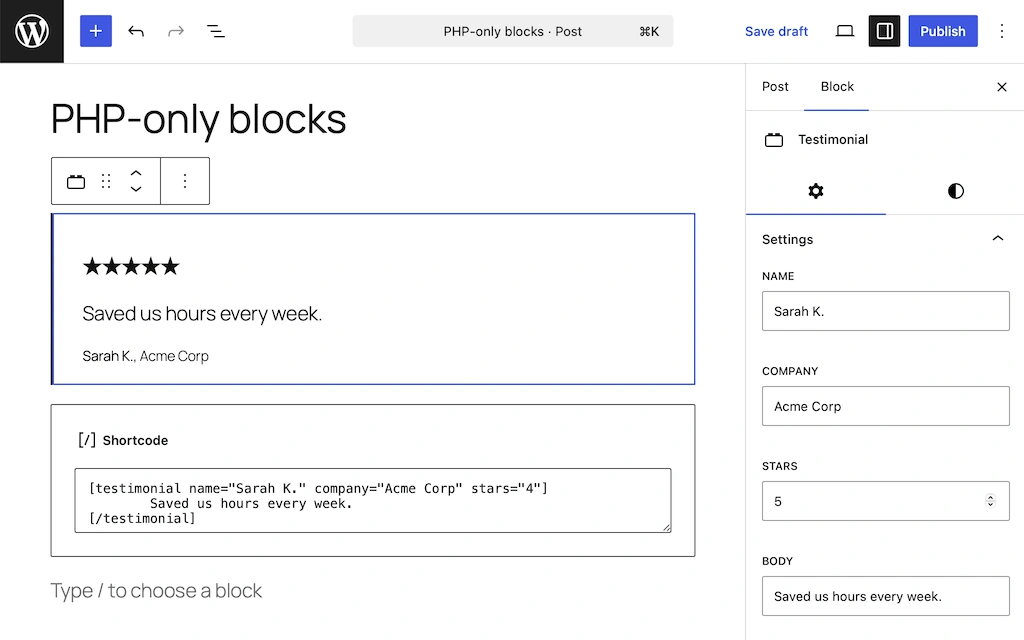
A few things to note here. First, a shortcode’s inner content doesn't have a direct equivalent in PHP-only blocks. The review body becomes a string attribute edited from the sidebar Inspector Controls — a single-line text field, not an in-canvas rich text area. For a short testimonial quote this is fine. For longer body copy you'd want a JavaScript-registered block with a RichText component.
Second, get_block_wrapper_attributes() merges your class with whatever the editor adds for colour, typography, and spacing — so the native style panels work without any extra CSS wiring. The render_callback receives a $attributes array containing only the values the user set; no $content parameter, because inner content isn't supported.
What you get over the shortcode version:
- Live preview in the editor canvas. No more raw shortcode syntax — the author sees the rendered testimonial card as they edit.
- Auto-generated controls. Name, company, body (text inputs) and stars (number input) appear automatically in the sidebar Inspector Controls.
- Native colour, font, and spacing panels. Comes from
supports— no custom CSS needed. - Discoverable. The block appears in the inserter under its name, with an icon.
Translation-Ready Out of the Box
There are two distinct translation concerns when working with PHP-only blocks, and it's worth being clear about which is which.
The first is static strings baked into your PHP template — labels, button text, UI copy. These are handled by __() and _e(), just as in any WordPress PHP file. In the block above, the stars label is an example:
/* translators: %d: star rating out of 5 */
$stars_label = sprintf( __( '%d out of 5 stars', 'my-plugin' ), $stars_count );Standard WordPress tooling picks these up automatically. Nothing extra needed.
The second concern is user-entered content stored as block attributes — the testimonial body, the reviewer's name, the company. This is the content your editors actually type into the block, and __() doesn't touch it. On a multilingual site, these attribute values need to be translated into each language separately, and that's not something WordPress handles on its own.
Gato AI Translations for Polylang supports PHP-only blocks out of the box, the same way it supports Gutenberg, Bricks, Elementor, and other page builders. No extra setup is required.
All string attributes are automatically registered for translation. If a specific field should not be translated — an internal reference, a URL, a numeric code stored as a string — you can opt it out with a filter.
For the testimonial block in this article, the reviewer name, company, and body text are all translated automatically — no configuration beyond installing the plugin.
What PHP-Only Blocks Can't Do (Yet)
The current limitations of PHP-only blocks:
- No inner blocks or nesting. You can't drop other blocks inside a PHP-only block.
- No in-canvas rich text editing. The
RichTextcomponent requires JavaScript. Text controls renders as a sidebar text field only. - Sidebar string fields are single-line. A
stringattribute becomes aTextControl, not aTextareaControl— not ideal for longer copy. - No image or media picker attributes. Image/file upload support is planned for a later release via the Block Fields API.
- Editor preview has a round-trip delay. Attribute changes trigger a REST API request to re-render on the server, so the preview doesn't update instantly.
For simple structured blocks — testimonials, CTAs, notices, author bios, business listings — PHP-only blocks hit the sweet spot. For anything requiring rich in-canvas editing, JavaScript registration remains the right tool.
What's Next
WordPress 7.0's PHP-only blocks bring block development within reach of any PHP developer. One PHP file, one register_block_type() call, and you have a fully functional Gutenberg block with sidebar controls, a live canvas preview, and native style support. You write PHP. You get a block. No tooling. No build. No JavaScript.
If you're building multilingual sites, Gato AI Translations works seamlessly with PHP-only blocks — your content is translatable from day one.
Ready to go further?
- Developing WordPress blocks without JSX or a build process — for developers who want to add minimal JavaScript without a full build pipeline
- Beginner WordPress Developer course — a complete foundation for block development
